
Non-Conformance Records (NCR)
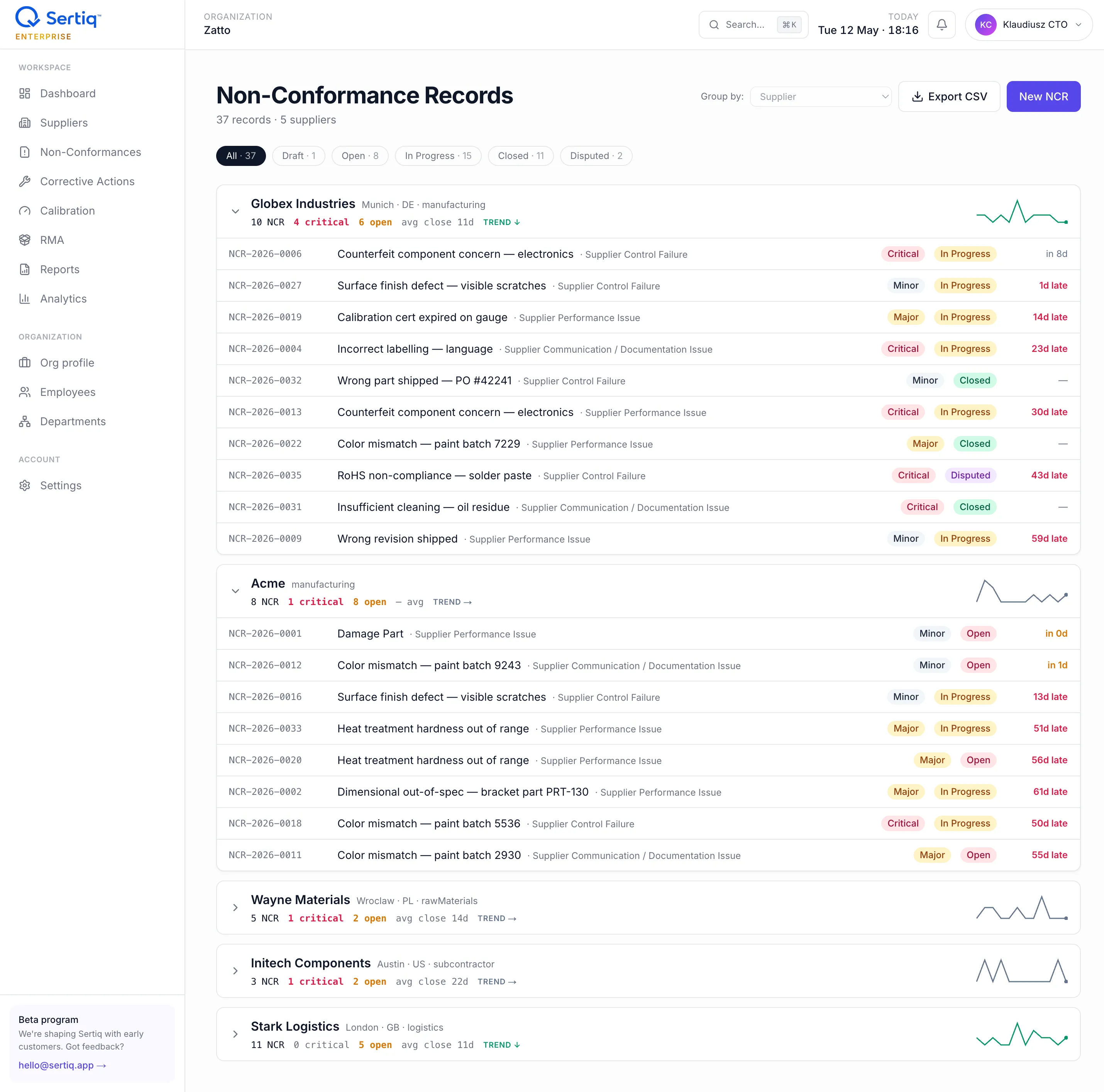
A Non-Conformance Record (NCR) captures a single instance where a supplier-provided product, service, or process did not meet your specification. In Sertiq, every NCR is bound to one supplier and one ISO 9001 clause, and feeds the supplier’s scorecard and risk band.
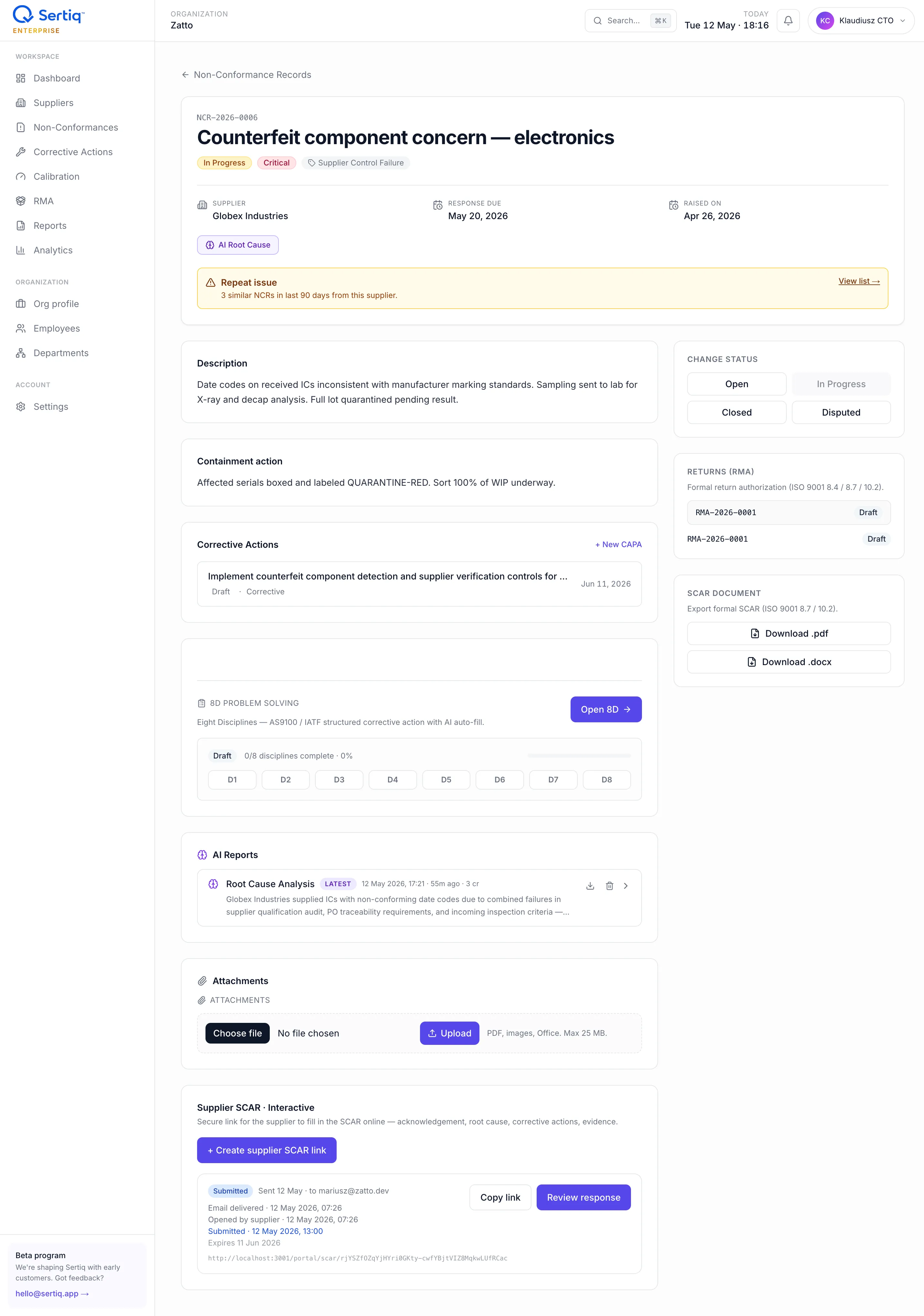
The detail page collects everything that belongs to one NCR: description, containment, linked CAPAs, 8D, AI Root Cause analysis, supplier SCAR portal link, attachments, and export buttons.
How NCRs map to ISO 9001
Section titled “How NCRs map to ISO 9001”NCRs in Sertiq map directly to ISO 9001:2015 clause 8.4 — Control of externally provided processes, products and services:
8.4.1General — supplier did not meet the controls you defined.8.4.2Type and extent of control — the verification, inspection, or release step failed.8.4.3Information for external providers — your spec, drawing, or PO requirement was not communicated or honoured.
For critical NCRs, Sertiq additionally records a containment action to satisfy clause 8.7 (“Control of nonconforming outputs”).
Raise an NCR
Section titled “Raise an NCR”-
Open NCR → New (or use the + New NCR button from a supplier’s profile to pre-fill the supplier).
-
Pick the supplier from the dropdown. The list is scoped to your organisation.
-
Enter a short title (max 200 chars) and a description of at least 20 characters. The description is the part that ends up in your audit
.docx, so be specific: part number, lot, drawing revision, measured value vs spec. -
Set the ISO clause (
8.4.1,8.4.2, or8.4.3) and severity (minor,major,critical). -
If severity is
critical, fill the containment action field. This is enforced at the database level — you cannot save a critical NCR without it. -
Optionally set a response due date and attach files (photos, PDFs, certificates) — up to 25 MB per file, stored in Cloudflare R2.
-
Click Publish NCR. Sertiq assigns the next number in the
NCR-YYYY-NNNNseries for your organisation and routes you to the NCR detail view.
Severity levels
Section titled “Severity levels”| Level | When to use | Required fields |
|---|---|---|
minor | Cosmetic or low-impact issue, no production stoppage. | Standard fields. |
major | Affects fit, function, or delivery; needs a CAPA. | Standard fields. |
critical | Safety, regulatory, or production-halting issue. | Containment action mandatory. |
The containment action is the immediate, short-term measure (segregate the lot, stop shipment, switch to alternate supplier) you take before the long-term corrective action lands. Auditors look for it on every critical NCR.
Status lifecycle
Section titled “Status lifecycle”draft ─► open ─► inProgress ─► closed │ ▲ └────────────────► disputeddraft— saved but not published. Excluded from quota counts, dashboards, and analytics. See Drafts.open— published; awaiting first action from the assignee or supplier.inProgress— root cause investigation or CAPA work has started.closed— verified resolved.closed_atis stamped automatically.disputed— supplier rejects the NCR; escalation path for QE manager.
Auto-numbering
Section titled “Auto-numbering”The NCR number is generated server-side inside a SECURITY DEFINER RPC, so two users raising NCRs at the same instant cannot collide. The pattern is:
NCR-{YYYY}-{NNNN}YYYY is the calendar year of creation. NNNN is a zero-padded sequence that resets per organisation, per year — so NCR-2026-0001 is your first NCR of 2026 regardless of how many other Sertiq tenants exist.
Attachments
Section titled “Attachments”- Where: Cloudflare R2 bucket
qualio-attachments, keyed{org_id}/ncr/{ncr_id}/{file_uuid}.{ext}. - Size: up to 25 MB per file.
- Access: private; downloads use short-lived signed URLs scoped to your organisation.
- Retention: kept indefinitely until you delete the NCR or your plan storage cap forces cleanup.
Related
Section titled “Related”- CAPA — link a corrective action to an NCR.
- Drafts & autosave — how unsaved NCRs behave.
- ISO 9001 clause 8.4 — clause reference.